Iron Rain wolf logo
╭━━╮╭━━━╮╭━━━╮╭━╮╱╭╮   ╭━━━╮╭━━━╮╭━━╮╭━╮╱╭╮
╰┫┣╯┃╭━╮┃┃╭━╮┃┃┃╰╮┃┃   ┃╭━╮┃┃╭━╮┃╰┫┣╯┃┃╰╮┃┃
╱┃┃╱┃╰━╯┃┃┃╱┃┃┃╭╮╰╯┃   ┃╰━╯┃┃┃╱┃┃╱┃┃╱┃╭╮╰╯┃
╱┃┃╱┃╭╮╭╯┃┃╱┃┃┃┃╰╮┃┃   ┃╭╮╭╯┃╰━╯┃╱┃┃╱┃┃╰╮┃┃
╭┫┣╮┃┃┃╰╮┃╰━╯┃┃┃╱┃┃┃   ┃┃┃╰╮┃╭━╮┃╭┫┣╮┃┃╱┃┃┃
╰━━╯╰╯╰━╯╰━━━╯╰╯╱╰━╯   ╰╯╰━╯╰╯╱╰╯╰━━╯╰╯╱╰━╯
Native macOS · iPadOS · iOS  ·  Agent Development Environment

Run real coding agents
on your own Mac.
Drive them from anywhere.

Iron Rain is a native Apple ADE for opencode, claude-code, pi, prime-agent, oh-my-pi, and any CLI agent. Launch a session on your Mac, then watch it stream, steer it mid-run, and approve its tool calls from your iPhone lock screen — over an end-to-end encrypted link. Configure an MCP server once and every agent gets it. Your hardware, your subscriptions, your keys. No cloud middleman, no per-seat compute.

What it is

One app for the whole agent loop —
desk to pocket.

Most agent tools force a trade-off: cloud SaaS that rents you someone else's sandbox and holds your keys, or a desktop plugin that chains you to your chair. Iron Rain is neither. The agents run on your Mac, in your real filesystem, on your existing subscriptions.

A native app on both macOS and iOS gives you the same session everywhere: write a prompt at your desk, keep watching from the train, approve a git push from the coffee line. Every byte between phone and Mac is end-to-end encrypted, and a stateless relay only ever forwards ciphertext.

Any agent, one interface

opencode over HTTP/SSE, claude-code via the Agent SDK, pi, prime-agent and oh-my-pi over JSONL-RPC, plus any custom CLI — codex, gemini, cursor-agent, aider, goose, crush and more. Detected on install, and verified to be the tool it claims before anything is routed to it.

Remote from anywhere

The app races your LAN and encrypted relays (Cloudflare Durable Objects, Fly fallback) so a session reaches you at home, on Wi-Fi, or on cellular — with APNs push.

Your hardware, your keys

Nothing runs in our cloud. Your code, prompts, and credentials stay on your Mac. No analytics or tracking by default — diagnostics are scrubbed and opt-in.

Core capabilities

A real development environment, not a log tail.

Multi-provider sessions

Start a session with opencode, claude-code, pi, prime-agent, oh-my-pi, or a custom CLI agent and drive them all through the same native interface. Pick or switch the model per session, hot-swap between multiple accounts, and let Iron Rain probe each provider's remaining quota before you spend a token.
Per-session provider, model, and account selection

Approve from your lock screen

When an agent wants to run a shell command, write a file, or push a commit, a push notification lands on your iPhone. Tap to open, then Allow or Deny the exact tool call — the agent waits and resumes from precisely where it paused. Cost budgets and spending guardrails stop a runaway job before it overspends.

Push-to-open approval with per-call Allow / Deny

Chat that renders itself

A native composer with slash-command completion, per-session drafts, and code-safe typing (no smart quotes). Responses stream markdown and thinking, with rich inline tool cards — the command plus expandable output — across every harness. With generative UI (iron:ui), agents render native tables, checklists, callouts, diffs, and tappable choices right in the thread, even from a plain CLI. Long answers fold to a readable preview with the rest one tap away, and a big table or plan collapses to a card instead of a wall of scrolling.

Streaming markdown, tool cards, and inline generative UI

Sub-agents you can watch

Delegate scoped work to sub-agents and see each one as a collapsible block that streams its own progress inline. Expand a sub-agent to follow exactly what it's doing, or collapse it and keep your eye on the main thread — no more guessing what the swarm is up to.

Delegated sub-agents streaming inside the parent session

Full Jira & Linear editing

Not just read-only mirrors. Edit assignee, labels, sprint or cycle, estimate, and due date; leave comments; and work a real-status Kanban board with drag-drop transitions, ticket creation, sprints, and attachments — all inside the app. Kick off issue → PR loops straight from a card.

Real-status columns, drag-drop transitions, inline edits

Fan out, then actually compare

Race the same prompt across N agents in isolated git worktrees — or split a job into subtasks and run them in parallel. When they finish you get one comparison screen: what each agent says it did, how many files it touched, how long it took. Keep the winner and the rest are discarded with their worktrees. Ask for a recommendation and a fresh agent reads every attempt and suggests one. Plus checkpoints to roll back, and Loops — recurring workflows that watch for tickets, plan, build, and open PRs hands-free.

Every attempt side by side — summary, diffstat, and one tap to keep

Autonomous heartbeat + budgets

Let a long job run unattended. The heartbeat loop nudges a session toward completion within a dollar budget and a nudge cap, so it finishes the task without running away. Live cost and token meters keep spend visible, and a no-response watchdog self-heals a session when the agent stream drops mid-turn.

Budget-bounded autonomy with self-healing recovery

The Command Deck

Five destinations — Sessions, Loops, Fleet, Issues, and Activity — put every running agent in one place. A fleet dashboard shows the whole swarm at a glance, an activity feed collects a “needs you” inbox of everything waiting on your input, and a Cmd-K palette jumps you anywhere in a keystroke.

Sessions · Loops · Fleet · Issues · Activity, plus Cmd-K

One MCP registry for every agent

Add an MCP server once and every agent gets it — opencode, claude-code, and any CLI agent you’ve configured. Iron Rain imports the servers your agents are already set up with, then supervises each one once behind a local gateway, so the same server stops running three times with three copies of your credentials. Browse the public registry to install, test a server to see its real tool list, and keep every key on your Mac.

Import from your agents, supervise once, inject everywhere

Permissions that fit the task

“Always allow” can mean this exact command shape, this folder, or this project — not a blanket yes to every shell call forever. Switch a session to Ask for read-only or Architect to plan first, and see every standing rule in one place to revoke it. All of it is enforced in the daemon, so it applies to every agent equally — including the ones that have no permission model of their own, and to MCP tools too.

Scoped rules, read-only modes, one place to take them back

Hand someone the wheel

Send a share link and a teammate can watch a live session — or steer it, if you let them. Invites carry their own credential and expire, so sharing never means handing over your keys, and they can be revoked at any time. Approvals stay yours: someone you’ve let steer can ask the agent to act, but only you authorize a tool that runs with your credentials on your Mac.

Watch-only by default, revocable, approvals stay with the owner
Built-in IDE

Inspect, edit, and review code without leaving the app.

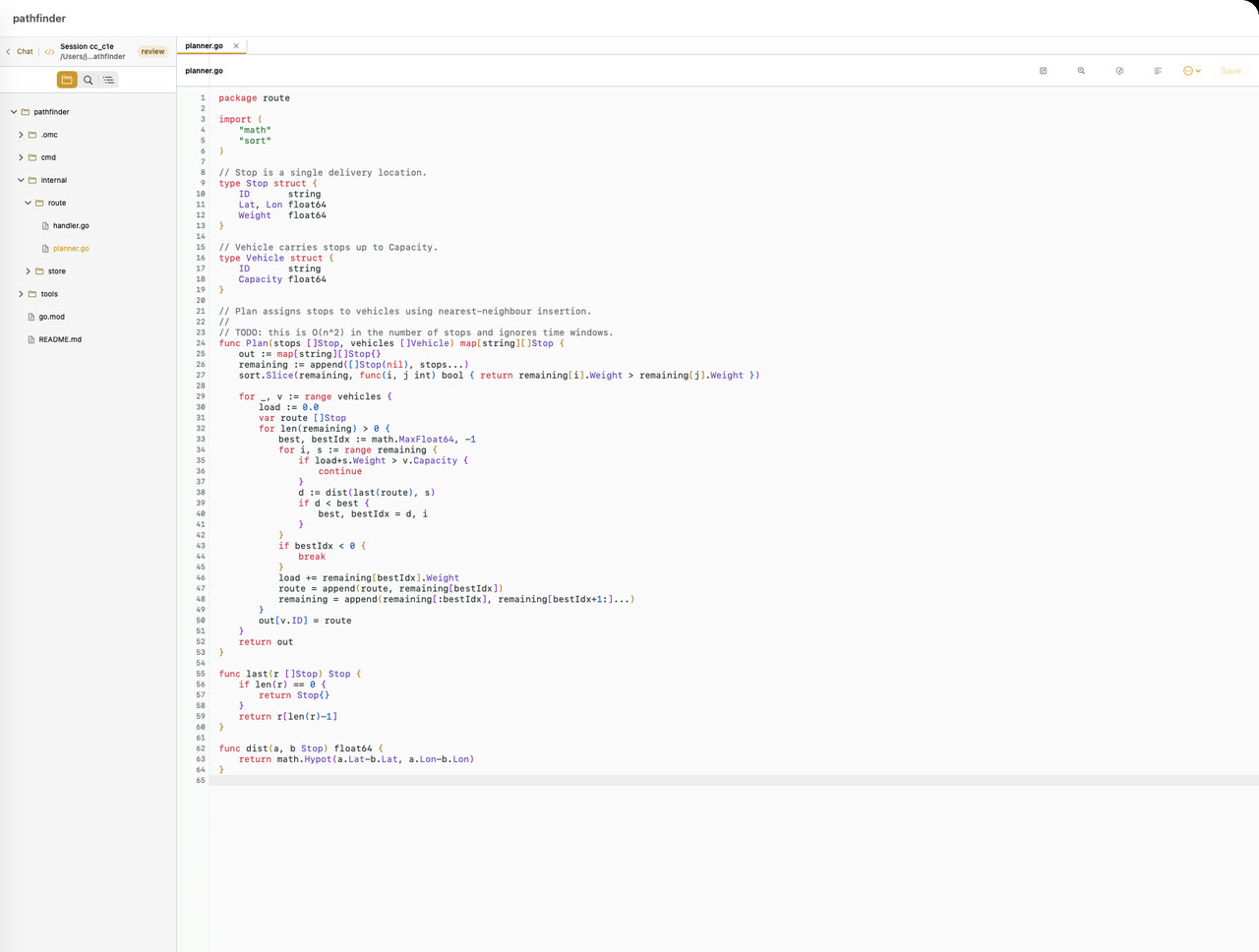
Iron Rain ships a native syntax-highlighted editor with a file tree and full LSP support — diagnostics, hover docs, go-to-definition, completion, and rename — powered by the same language servers running on your Mac. It's scoped to the session and project, so you see exactly the code the agent is touching.

Then review the change like a pull request: a native diff renderer lets you comment on any line, and that comment becomes a prompt the agent acts on. Correct a mistake or redirect an approach without opening a terminal or reaching for your laptop.

  • Inline diagnostics, hover docs, go-to-definition & rename from the language server
  • Native diff review — comment on a line to steer the agent
  • Syntax-highlighted editor with a project file tree
  • Inline image preview for agent-generated assets
  • sourcekit-lsp  ·  pyright  ·  rust-analyzer  ·  clangd
The built-in editor: project file tree, open tabs, and syntax-highlighted Go
Native editor with live diagnostics, hover docs, and diff review
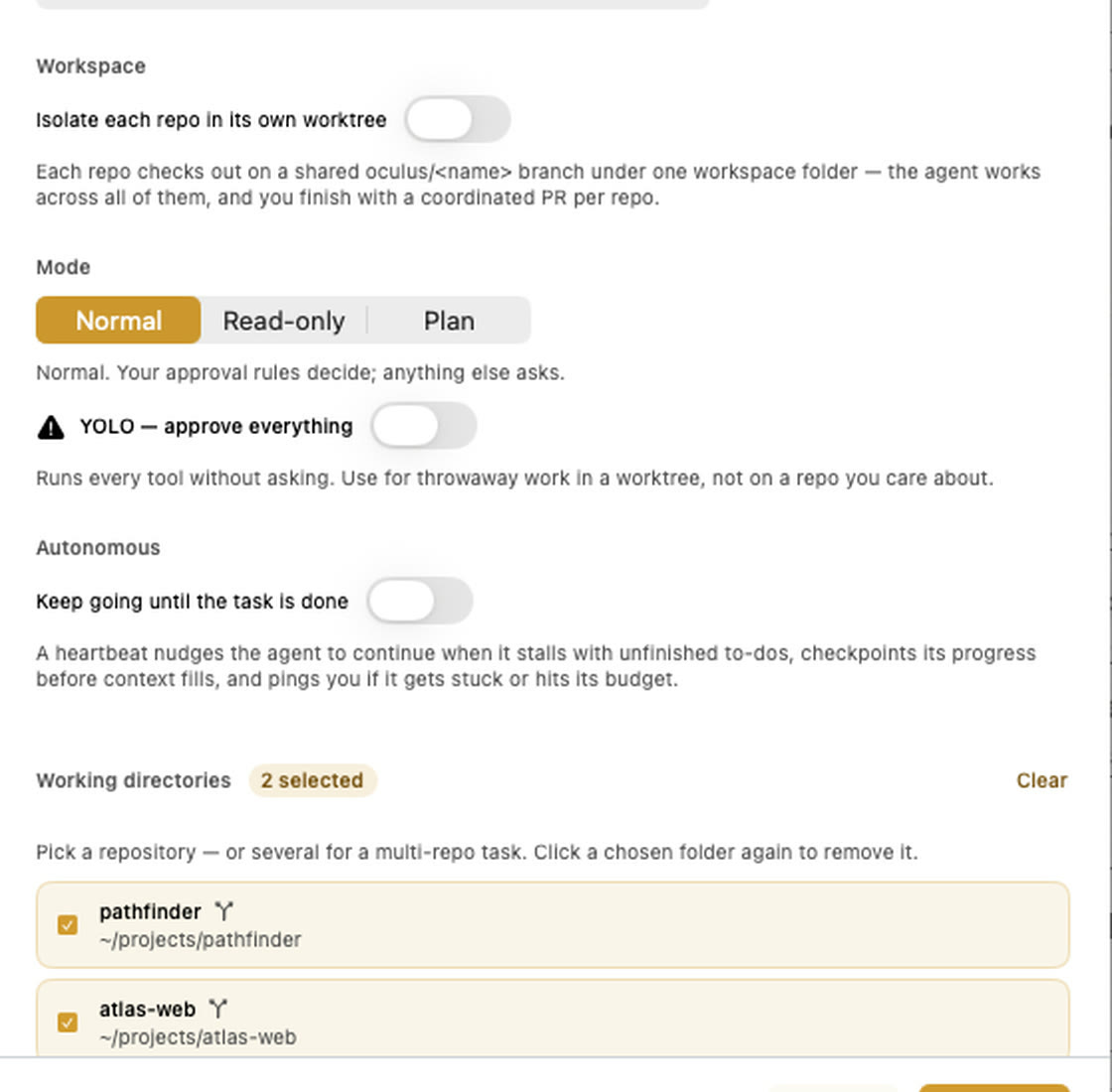
Starting one task across two repositories, each on a shared branch
One task across many repos, each in its own worktree
Workspaces

Work that spans repos, machines, and the browser.

Group several repositories into one cross-repo workspace and run a coordinated job across all of them. Each repo gets an isolated git worktree — and worktrees now share node_modules instead of reinstalling, so spinning one up is fast.

Reach beyond your Mac with SSH remotes: run and inspect a worktree on another box, port-forward included. And with Design Mode, an in-app browser element picker drops the exact element's HTML and CSS straight into your prompt.

  • Cross-repo workspaces with isolated per-repo worktrees
  • Shared node_modules so worktrees start fast
  • SSH remotes — run a worktree on another box with port-forward
  • Design Mode: pick a browser element, send its HTML/CSS to the agent
Why Iron Rain

The parts other agent tools skip.

Cloud SaaS agents and desktop IDE plugins each leave a gap. Iron Rain closes it — on your hardware, on both your devices.

Capability Iron Rain Cloud SaaS agents Desk-only IDE plugins
Runs on your Mac, not rented cloud compute
Your own subscriptions & API keys
Approve tool calls from an iPhone lock screen
Multi-provider — opencode, claude-code, pi, prime-agent, oh-my-pi, CLI single varies
End-to-end encrypted phone↔Mac link n/a local only
One MCP registry shared by every agent per-agent per-editor
Permissions scoped to a command, folder, or project varies per-tool
Fan out and compare the results side by side varies
Share a live session, watch-only by default varies
Generative-UI chat & rich inline tool cards varies
Full two-way Jira / Linear editing
Built-in native editor with LSP + diff review
Parallel fan-out across isolated worktrees varies
Autonomous heartbeat + dollar budget varies

Comparisons above reflect general categories of tooling, not specific companies. Iron Rain works with opencode, claude-code, pi, prime-agent, oh-my-pi, and custom CLI agents.

Security & trust

Your code never leaves your Mac.

Iron Rain is private by construction. We can't see your code, your prompts, or your keys, because none of it ever reaches our servers — the relay only forwards ciphertext.

End-to-end encrypted

The iPhone/iPad app and Mac daemon establish keys with X25519 and encrypt every session with ChaCha20-Poly1305. The relay — Cloudflare Durable Objects, with a Fly fallback — forwards only opaque ciphertext.

Runs on your hardware

The agent runs on your Mac, in your environment, against your real filesystem. No cloud sandbox and no third-party compute ever touches your source.

Your subscription, your keys

Agents run on your existing subscriptions. Any API keys live on your Mac only, never on our servers, and multi-account credentials hot-swap on demand.

No analytics, no tracking

No ads, no third-party trackers, nothing on by default. Optional diagnostics are scrubbed and strictly opt-in. Read the full privacy policy — it's short and plain-English.

Get started

Up and running in two steps.

No configuration files, no dependency wrangling. The installer handles everything.

Install on your Mac

One command installs the Iron Rain Mac app and daemon, then launches the app. It auto-detects opencode, claude-code, pi, prime-agent and oh-my-pi, sets up the integration on first run, and shows a pairing QR code to scan from your phone.

curl -fsSL https://howlerops.github.io/iron-rain/install.sh | sh

Headless or Linux? The same command installs just the daemon (~/.oculus/oculusd.log). Prefer source? cd daemon && go run . serve --secret <your-secret>

Join the iPhone & iPad TestFlight

Join the TestFlight beta, install Iron Rain on your iPhone or iPad, then scan the QR code shown by the Mac app to pair your devices. Everything after that is automatic — and on iPad you get the full management layout, not a stretched phone app.

Join the TestFlight →